Tablet Liquid Damage Guide for Spill Recovery
A tablet dropped in the bath, knocked-over coffee at the desk, or rain caught in an open bag can turn into a serious fault fast. This tablet liquid damage guide covers the first moves that give your device the best chance of recovery – and the common mistakes that turn a repairable spill into a dead tablet or lost data.
Liquid damage is not always obvious. Your tablet may appear to work after the accident, then develop charging faults, screen flickering, weak speakers, random restarts or a boot loop days later. That delay is why acting quickly matters.
Tablet liquid damage guide: what to do immediately
Your first job is to stop power moving through a wet device. Electricity and moisture can create a short circuit, while corrosion keeps spreading as liquid dries inside the tablet.
If your tablet has been exposed to liquid, do the following in order:
- Remove it from the liquid and switch it off immediately. If the screen is unresponsive, do not keep pressing buttons or force a restart.
- Disconnect the charger, keyboard case, headphones, USB accessories and any other cables.
- Take off the case, cover and removable SIM tray if your model has one. These trap moisture around ports and edges.
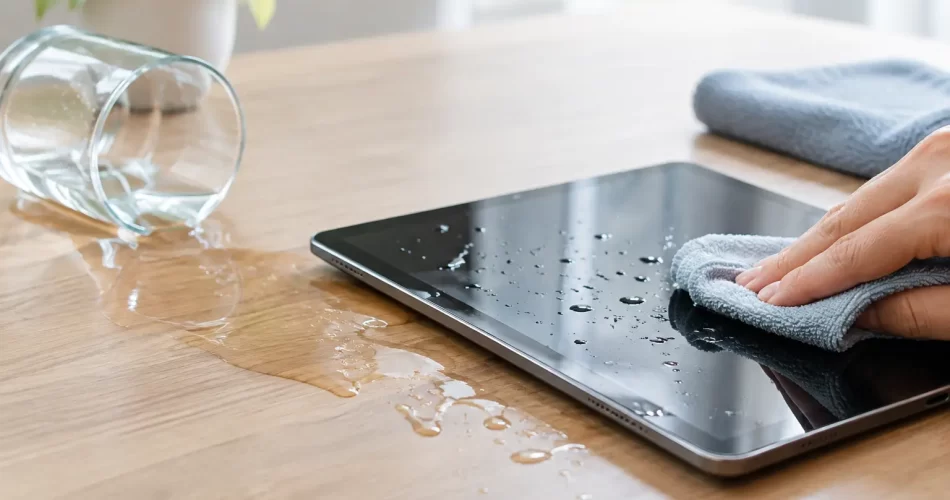
- Hold the tablet with ports facing down and gently blot the outside with a clean, dry cloth. Do not shake it.
- Keep it switched off and arrange a professional inspection as soon as possible, especially if the liquid reached the charge port, speakers or screen edges.
A quick wipe only deals with what you can see. On many iPads, Samsung Galaxy Tabs and other modern tablets, liquid can pass through a damaged seal, speaker mesh, button assembly or charge port and reach the battery connector or logic board.
What not to do after a tablet gets wet
The wrong home remedy can make the damage worse. Do not plug the tablet in to see whether it still charges. A wet charge port can short, damage the charging circuit or affect the battery management system.
Do not use a hair dryer, heater or oven. High heat can warp the display, weaken adhesives, damage the battery and drive moisture deeper into the device. Compressed air is also a poor idea because it can push liquid further beneath shields and connectors.
Rice does not repair liquid damage. It cannot remove sticky drink residue, salt deposits or corrosion from a logic board. It can also leave starch and dust in ports. Silica gel may reduce surface moisture in some cases, but it is not a substitute for opening, cleaning and testing a tablet that has had a proper soaking.
Avoid repeatedly turning the tablet on to check it. A device that powers up is not necessarily safe. Every attempt can send current through areas that are still wet or corroding.
Why water is not the only problem
Clean water is usually less damaging than soft drink, coffee, beer, seawater or pool water, but no liquid exposure is harmless. Drinks leave conductive sugar, milk or mineral residue behind. Seawater and chlorinated water are particularly aggressive because salts accelerate corrosion.
Darwin’s heat and humidity can also complicate matters. Once moisture is inside a tablet, warm conditions can speed up corrosion on tiny board components. A device left in a hot car after a spill may look dry externally while damage continues underneath.
The amount of liquid matters, but so does where it entered. A few drops directly into a USB-C or Lightning port can cause charging problems. Liquid around a cracked screen can reach display connectors and cause lines, black patches, ghost touch or backlight failure. A full submersion can affect the battery, cameras, microphones, speakers and motherboard at once.
Signs your tablet needs professional liquid damage repair
Bring the tablet in even if it seems normal if it was fully submerged, exposed to a sugary or salty drink, or has a cracked screen or loose charge port. Preventative cleaning can be the difference between a straightforward repair and a board-level fault later.
Clear warning signs include a tablet that will not charge, gets unusually hot, drains its battery quickly, restarts without warning, has no sound, shows display lines, fails to detect touch, or will not turn on. A burning smell, swelling screen or rapidly heating battery needs urgent attention. Stop using it, do not charge it, and keep it away from flammable materials.
Some faults can look unrelated to the original spill. Face or fingerprint recognition may stop working, cameras may fog or fail, Wi-Fi may drop out, or the tablet may only charge at a certain angle. These are often connector, corrosion or component-level issues rather than a simple software problem.
What a proper liquid damage assessment involves
A professional assessment should go beyond drying the outside. The tablet needs careful disassembly, with the battery disconnected before technicians inspect internal indicators, connectors, shields and the logic board for moisture or corrosion.
The affected areas can then be cleaned using suitable electronics-grade solutions and equipment. Connectors, charge ports, cameras, display assemblies and batteries are tested individually where appropriate. If corrosion has damaged a component on the board, micro-soldering and logic board repair may be required rather than replacing an entire tablet.
The repair path depends on the model and the fault. A tablet with a damaged charge port may be economical to repair quickly. A heavily corroded motherboard with display, battery and board faults may require more time and a clear discussion about repair cost versus replacement value. Straight answers matter, particularly for an older tablet.
At iSmashed, liquid damage work begins with diagnosis, not guesswork. Where repair is viable, the focus is on restoring reliable use and protecting your files, with advanced board-level repair available for faults that ordinary part swaps cannot solve.
Protecting data after a spill
For many people, the tablet is replaceable but the data is not. It may hold family photos, work documents, school files, app data, messages or two-factor authentication access. If the device still works after the spill, resist the urge to keep using it for hours while you sort through files. Back up essential data only if it can be done without charging or repeatedly rebooting the device, then switch it off.
If the tablet will not start, data recovery may still be possible. It depends on the model, the extent of corrosion and whether the storage and logic board can be stabilised. Modern tablets use encryption, so recovering data often requires repairing the original board enough for the device to boot. Moving a storage chip to another board is rarely a simple option.
Tell the technician if data is your priority before authorising work. That changes the repair approach. The aim may be to stabilise the original board and get one successful boot for backup rather than complete every non-essential cosmetic repair first.
Can a water-damaged tablet be repaired?
Often, yes – but there is no honest blanket guarantee. Fast action, clean water exposure and limited internal corrosion improve the odds. Delay, saltwater, sugary drinks, repeated charging attempts and prior screen damage can make the repair more complex.
Even after a successful repair, liquid-damaged devices need proper testing. Charging, battery behaviour, touchscreen response, cameras, microphones, speakers, Wi-Fi and Bluetooth should all be checked. A quality repair is about more than seeing the home screen light up.
If your tablet has been wet, keep it powered off, keep it off the charger and get it assessed before corrosion gets the chance to spread. The sooner the right repair starts, the better the chance of saving the tablet and the information you rely on.