
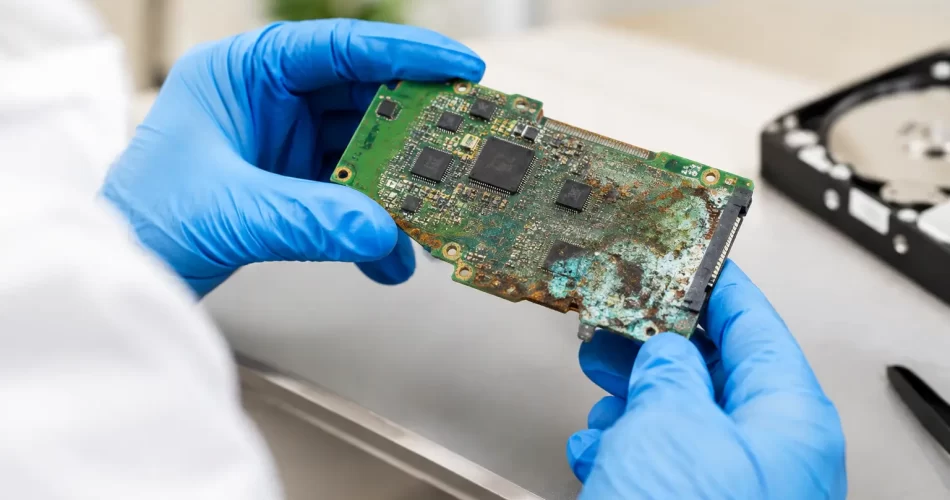
Logic Board Corrosion Case Study That Saved Data
A coffee spill can look harmless after a quick wipe-down. In this logic board corrosion case study, the device still switched on, charged briefly and gave its owner false confidence – until it began restarting, refusing to detect the internal drive and shutting down without warning. The real problem was not the liquid on the keyboard. It was the corrosion already developing underneath the board.
For a Darwin professional with work files, client messages and photos stored locally, waiting for the device to fail completely was not an option. The priority was clear: assess the damage properly, protect the data where possible, and avoid paying for a replacement before knowing whether a board-level repair could save the machine.
The device: working, then failing fast
The customer brought in a water-damaged MacBook two days after a drink had been spilled near the keyboard. It had initially powered on after drying overnight. By the next morning, the trackpad was inconsistent, the battery percentage was jumping and the laptop would only boot intermittently.
That delay matters. Liquid damage is rarely a single-event fault. Once moisture reaches the logic board, it can carry contaminants into connectors, under chips and around power rails. Even when the visible liquid has evaporated, corrosion can continue reacting with metal contacts. Darwin’s heat and humidity can make a marginal device deteriorate faster.
A device that turns on is not necessarily safe to keep using. Every charging attempt can feed power through compromised components. Every restart can turn a repairable short into a failed chip or damaged data pathway.
Why logic board corrosion is different
A screen replacement is usually a contained job. A corroded logic board is not. The damage may sit in one small area, or it may affect several circuits with completely different jobs: charging, battery communication, display output, USB-C detection, storage access or power management.
The customer had already tried the common fixes. They had left the laptop open to dry and tested another charger. Neither addresses mineral residue or oxidation. Rice does not remove corrosion, and blasting ports with heat can push moisture deeper or damage heat-sensitive components.
The first step was to stop further testing and inspect the board under magnification. This showed residue around a power-management area and oxidation near a connector associated with charging and system power. There was also evidence that liquid had travelled beyond the initial spill point. That is normal. Liquid follows gravity, capillary action and cable routes rather than staying where it lands.
Logic board corrosion case study: diagnosis before repair
A proper corrosion repair starts with diagnosis, not a parts quote. On this MacBook, the board was removed and inspected for discolouration, damaged pads, broken traces and corrosion under component edges. The affected zones were then cleaned with electronics-safe methods to expose the actual condition of the board.
Cleaning is essential, but it is not always the repair. Once corrosion has eaten into a solder joint or track, the connection may still fail even when the board looks clean. That is where board-level testing and micro-soldering matter.
Technicians checked for shorts and abnormal readings on relevant power lines before applying power. This controlled approach reduces the risk of causing more damage during diagnosis. The board was not simply plugged in repeatedly to see whether it would behave.
The test results pointed to a damaged component in the power circuit and a weakened connection in the affected area. The charging fault, random shutdowns and unstable boot behaviour were symptoms of the same underlying issue: the board could not maintain clean, reliable power.
The repair: clean, rebuild, test
The repair involved removing the damaged component, treating the affected area, restoring the compromised connection and fitting a replacement component where required. This is precise work. Logic boards use tiny pads, tightly packed circuits and heat-sensitive chips. Too much heat, poor alignment or a lifted pad can turn a recoverable fault into a much larger repair.
After micro-soldering, the board was tested again before it went back into the laptop. The machine needed to charge normally, start consistently and remain stable under use. A successful boot alone is not enough. A device can appear fixed for five minutes, then fail once it draws more power, warms up or reconnects to Wi-Fi and storage.
In this case, the MacBook powered up reliably after repair. The internal storage became accessible, allowing the customer to confirm their key files were intact. The laptop then completed charging and stability checks before collection.
That result is the best-case outcome, but it is not a promise every water-damaged device can support. Liquid can destroy storage chips, damage multiple power rails or corrode board layers that cannot be rebuilt economically. The value of early diagnosis is finding out which situation you are dealing with before replacing major parts or writing the device off.
Data recovery changes the decision
For many customers, the device itself is replaceable. The data is not. University assignments, business documents, family photos, accounting files and project folders often live on a laptop that has never been backed up properly.
With newer devices, storage may be integrated with the logic board rather than sitting on a removable drive. If the board will not power on, simply taking out a hard drive may not be possible. Restoring enough board function to access the data can be the most practical recovery route.
That changes the repair conversation. If the laptop is older and needs extensive work, a full repair may not make financial sense. But a targeted board repair to recover critical files may still be worthwhile. It depends on the extent of corrosion, the device model, the condition of the storage system and how urgently the files are needed.
In this case, the customer chose to prioritise data access and a stable return to work. Once the files were confirmed, they could make a calm decision about backups and future device plans rather than making one under pressure.
What to do after a spill
The fastest action after liquid damage is usually the cheapest one. Switch the device off. Disconnect charging cables and accessories. Do not keep testing it, do not charge it and do not rely on a bag of rice.
If it is a laptop, avoid turning it upside down aggressively or pressing keys repeatedly. Place it in a position that limits further spread where practical, then arrange a professional assessment as soon as possible. The goal is to prevent power from meeting moisture and corrosion, not to prove the device still works.
Phones and tablets need the same caution. A charging alert, muffled speaker, foggy camera, boot loop or sudden battery drain after water exposure can all point to internal damage. Even a device rated for water resistance can fail after age, impact damage or a weakened seal.
When board-level repair is the right move
Logic board repair is worth considering when the device has important data, is otherwise in good condition or has a fault that is isolated to a repairable circuit. It is also often the sensible option when the alternative is an expensive full-device replacement.
There are limits. Severe corrosion, long-term liquid exposure and damage across multiple board layers can make repair uncertain or uneconomical. A professional technician should explain the likely path, the risks and whether data recovery is realistic before proceeding.
At iSmashed, board-level diagnostics and micro-soldering are used for faults that ordinary parts swapping cannot solve, including water damage, charging failures, boot loops and no-power issues. The aim is straightforward: give you a clear answer quickly, then carry out the repair that makes sense for your device and budget.
If your device has been exposed to liquid, treat a brief recovery as a warning, not proof that it is fine. Power it down, keep it off charge and get it assessed before corrosion turns a small fault into lost data and a bigger bill.