Guide to Apple Watch Repairs for Darwin Owners
A cracked Apple Watch screen before a long shift, a battery that dies before lunch, or a watch that will not charge can quickly turn a useful device into dead weight. This guide to Apple Watch repairs explains what can usually be fixed, what needs urgent attention, and when a professional assessment is the smarter move than replacing the whole watch.
Start by preventing further damage
If the display is cracked but still working, avoid pressing hard on the glass or wearing the watch during physical work. Apple Watch screens sit close to the display and touch layers underneath. A small crack can spread, allow moisture in, or become a sharp edge against your wrist.
For a watch that has been wet, remove it from the charger immediately. Do not use a hairdryer, put it in rice, or keep trying to power it on. Heat can damage the battery and internal seals, while repeated charging can turn minor corrosion into a logic board fault. Switch it off if possible and arrange an inspection as soon as you can.
If the back of the watch is lifting away from the case, stop wearing and charging it. This often points to a swollen battery. It is not a fault to ignore for another week, especially in Darwin heat. A swollen battery can damage the screen, flex cables and internal components as it expands.
Guide to Apple Watch repairs: common faults
Apple Watch models are compact, tightly sealed devices. That makes repairs more delicate than a standard phone screen replacement, but many common issues are still repairable with the right tools, parts and diagnosis.
Cracked, smashed or unresponsive screens
Screen damage is one of the most common Apple Watch faults. You may have a visible crack, black ink-like patches on the OLED display, flickering, dead touch areas, or a screen that has detached from the frame after an impact.
A screen replacement may be suitable if the watch still powers on and the underlying damage is limited to the display assembly. However, a hard impact can also affect the housing, force-touch components, battery or internal connectors. The right repair is based on what has actually failed, not just what is visible from the outside.
Repair quality matters here. The screen needs to sit correctly, with the housing cleaned and inspected before resealing. A cheap repair that leaves gaps around the display can lead to dust, moisture and a second repair bill.
Battery draining too quickly or lifting the screen
Apple Watch batteries lose capacity over time. A watch that once lasted all day may begin needing a top-up by mid-afternoon, especially if it is older, heavily used for workouts, or regularly exposed to heat.
Battery replacement can restore practical daily use when the battery is the actual cause. But fast drain is not always a battery problem. Background syncing, watchOS issues, a failing display, charging faults and board-level damage can all produce similar symptoms. If the watch becomes hot, restarts repeatedly, or the screen is lifting, it needs professional attention rather than another charging cycle.
Charging faults and magnetic charger issues
When an Apple Watch will not charge, check the simple causes first. Try a known-good cable and power adaptor, clean the rear charging surface gently with a dry microfibre cloth, and remove any case that stops the charger sitting flat.
If it still will not respond, the fault may be in the battery, charging circuit, charging coil or logic board. Some watches show the red lightning bolt but never progress, while others stay completely dead. These symptoms need diagnosis before parts are ordered. Replacing a battery will not solve a board-level charging fault.
Digital Crown, side button and speaker faults
A sticky Digital Crown can result from sweat, grime or dried residue around the mechanism. Do not force it. Excess pressure can damage the internal assembly and compromise the case seal.
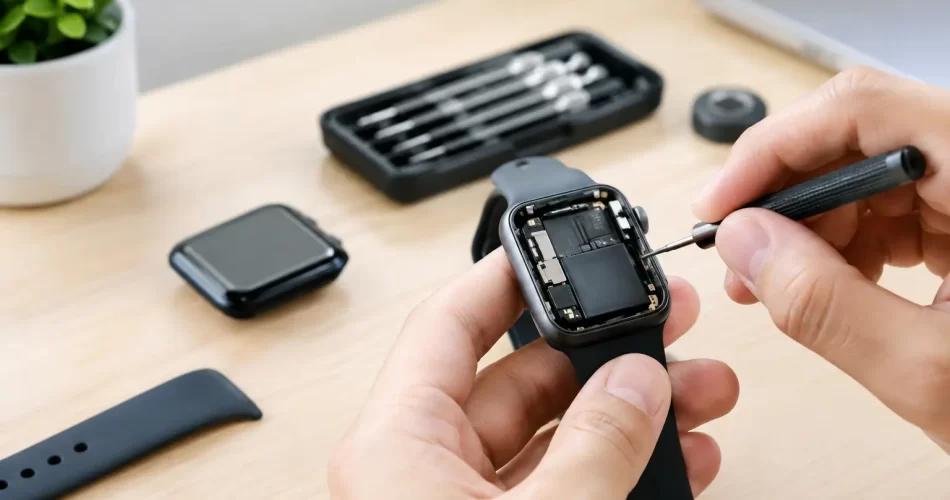
Side buttons that do not click, speakers that sound muffled, microphones that cut out, or haptic feedback that has stopped working may be caused by debris, liquid exposure or a damaged flex cable. These are small components in a crowded device. Proper disassembly is essential to avoid tearing cables or causing damage to the display during opening.
Water damage and corrosion
Apple Watch water resistance is not permanent. Seals wear with age, impacts can weaken the housing, and prior repairs may affect resistance if the device has not been resealed correctly. Even models designed for swimming can suffer damage after a knock, a cracked screen or years of regular use.
Signs of liquid damage include a foggy display, random touch inputs, rapid battery drain, no power, speaker distortion and boot loops. Early treatment gives the best chance of saving the watch and any data still accessible on it. Corrosion can continue long after the outside feels dry, which is why a water-damaged watch should not be left in a drawer for months.
Stuck on the Apple logo or restarting repeatedly
A watch trapped on the Apple logo may have a software problem, but it can also indicate failing storage, battery instability or logic board damage. A force restart is reasonable to try once. If the problem returns, do not keep repeating it for days.
Advanced faults can require board-level diagnosis and micro-soldering rather than a standard replacement part. This is particularly relevant after water damage, a severe impact, failed charging attempts or an unsuccessful previous repair. A proper diagnosis separates a recoverable fault from a watch that is no longer economical to repair.
Repair or replace? The decision comes down to value
The newest Apple Watch is not automatically the best answer. If your watch has a damaged screen or worn battery but otherwise works well, repair can be the more affordable and less wasteful option. It also means less time setting up a replacement, reconnecting accounts and rebuilding your daily routine.
Replacement may make more sense where the case is badly bent, the logic board has extensive corrosion, multiple major components have failed, or the repair cost approaches the value of a newer model. Older models also have limits around software support and features, so it is worth considering how long you realistically plan to keep the device.
For many Darwin customers, the key question is downtime. If the watch is used for work notifications, shift alerts, fitness tracking or contactless payments, a quick repair with a clear warranty can be better value than waiting through a lengthy replacement process.
What a professional Apple Watch repair should include
Apple Watch repairs should start with fault testing, not a guess based on one symptom. A technician should check power behaviour, charging response, display function, touch input, housing damage and signs of liquid exposure before recommending a repair.
Ask what part is being replaced, whether the device has other damage, how long the repair is expected to take, and what warranty applies to the work. At iSmashed, eligible repair parts are backed by a clear 3-month warranty, giving you certainty after the repair rather than a vague promise at the counter.
Be realistic about water resistance after any repair. A carefully resealed watch is far better than one left with damaged adhesive or a loose display, but no repairer should promise that an opened device is identical to its original factory condition. Avoid swimming or deliberately submerging it unless you have been clearly advised otherwise.
Before handing your watch in
If the watch is still responsive, back it up through its paired iPhone where possible. Keep your iPhone available, as unpairing or re-pairing may be required after certain repairs. Remove the band if you want to keep it, and tell the technician about drops, water exposure, overheating, previous repairs and any recent software issues. Those details make diagnosis faster and more accurate.
Do not delay if the screen is lifting, the watch is hot, the battery is swelling, or there are signs of water inside. Those faults can escalate quickly and may turn a straightforward repair into a more costly board-level job.
A broken watch does not need to stay off your wrist for long. Get the fault assessed early, choose a repair based on the device’s condition and value, and you will have a clear answer on whether it is worth fixing before spending money on a replacement.