Motherboard Repair Review: Is It Worth Fixing?
A motherboard repair review is rarely about one simple question: can it be fixed? The better question is whether fixing it will restore a device you rely on without wasting money or risking the data still stored on it. When your iPhone will not turn on, a MacBook has stopped charging, or a laptop has taken a drink, the fault may sit far deeper than a screen, battery or charging port.
Board-level faults can look dramatic, but they do not automatically mean your device is finished. A proper diagnosis separates a repairable component-level issue from damage that makes replacement the more sensible choice. For Darwin customers who need their phone, tablet or computer back for work, study, travel or family life, that distinction matters.
What motherboard repair actually means
A motherboard is the main circuit board that allows a device’s components to communicate. In Apple devices, it is commonly called a logic board. On phones, tablets, laptops, gaming consoles and drones, it controls power, charging, storage, display output, cameras, audio, wireless connections and much more.
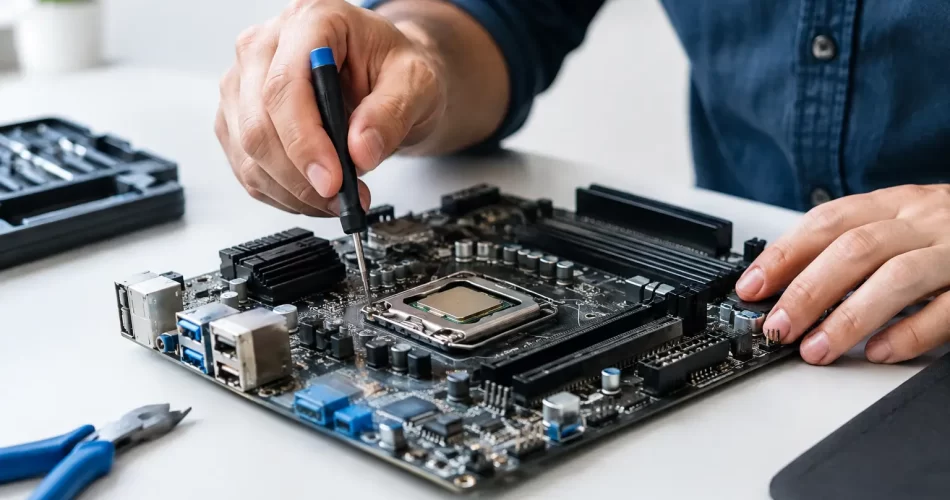
Standard repairs replace a complete part: a cracked display, depleted battery, broken back glass or worn charging port. Motherboard repair works at component level. A technician may trace a short circuit, replace a failed integrated circuit, rebuild a damaged connection, repair a lifted pad or remove corrosion under a shield. This is micro-soldering work, carried out with specialist equipment and a diagnostic process rather than guesswork.
That difference explains why board repair can save a device that other shops have declared beyond repair. It also explains why it is not always a same-hour job. A straightforward charge-port replacement may be completed quickly. Locating an intermittent power fault or water-damage short can take longer because the cause needs to be found before the repair can be trusted.
Motherboard repair review: when it is worth it
Board repair is often worth considering when the device has a high replacement cost, holds important data, or is otherwise in good condition. A recent iPhone, premium Samsung, MacBook, iPad, gaming console or business laptop may justify specialist work if the fault is isolated and the repair cost is clearly below replacement value.
It is particularly worthwhile when your data is the priority. Many modern devices encrypt their storage to the original board. Replacing the board may get the hardware working again, but it will not bring back photos, messages, files or notes stored on the failed one. If a device will not boot after liquid exposure, a failed update or a sudden power issue, repairing the original board can be the only practical route to data recovery.
The decision changes with age and condition. An older laptop with a failing motherboard, failing battery, damaged hinge and obsolete specifications may not be the best candidate for an expensive board repair. Likewise, severe corrosion that has spread across multiple circuits can make the outcome less predictable. A professional review should tell you that plainly, rather than selling a repair at any cost.
For small businesses, downtime has a price too. A hospitality operator unable to access bookings, a tradesperson without job photos, or a student facing a deadline may reasonably value a fast repair above the lowest possible quote. The right choice depends on the device, the fault, the data and how urgently you need it back.
Faults that point to a board-level problem
A dead device is not always a motherboard failure. A flat battery, damaged cable, blocked port or failed display can produce similar symptoms. That is why diagnosis comes first. Still, certain failures commonly indicate the need for logic board or motherboard-level testing.
No power or no charging
If a known-good charger does nothing, the power-management circuit, charging IC, USB-C circuitry or a short on the main power rail may be at fault. This is common after liquid damage, power surges and physical impact. Replacing a battery without testing the charging system can leave you with the same problem and an unnecessary bill.
Boot loop and repeated restarting
A phone or tablet that shows a logo, restarts and never reaches the home screen may have software trouble, storage issues or a board fault. The cause can include damaged sensors, failed NAND storage, an audio IC problem or power instability. A careful technician rules out software and external components before recommending micro-soldering.
Water damage that appears later
Liquid damage is deceptive. A device may work immediately after a spill, then fail days or weeks later as corrosion develops beneath shields and connectors. Rice will not reverse corrosion, and charging a wet device can make the damage worse. Turn it off, avoid plugging it in and arrange assessment as soon as possible.
Missing functions after a drop or previous repair
No touch response, no backlight, faulty Wi-Fi, no audio, Face ID issues, camera failure or no image on an external display can all be linked to board damage. Sometimes the cause is pry damage from an earlier repair, a torn connector or a missing filter component. The visible damage may be small, but the repair requires precision.
What a reliable diagnosis should include
A worthwhile motherboard repair starts with evidence. The technician should inspect the device, test charging behaviour, check current draw, assess for corrosion and isolate related components. On laptops and consoles, testing can include power rails, ports, display output and thermal behaviour. On phones and tablets, the process may involve checking for shorts, damaged connectors and failed ICs under magnification.
You should receive a clear explanation of the likely fault, the recommended repair and the expected cost before work proceeds. Board faults can reveal secondary damage once work begins, especially after liquid exposure. That does not make the repair unreliable, but it does mean honest communication matters. A cheap quote with no diagnosis can become costly if it is based on replacing parts until something works.
At iSmashed, advanced diagnostics and micro-soldering sit alongside everyday screen, battery and charging repairs. That means the device can be assessed as a whole rather than being pushed into a replacement-part solution when the real fault is on the board.
Cost, turnaround and warranty: what to expect
There is no single motherboard repair price because there is no single motherboard fault. Replacing one small charging component is very different from recovering a heavily corroded board with multiple damaged lines. Device model, component availability, previous repair attempts and the extent of liquid damage all affect the quote.
Turnaround also depends on the fault. Many standard repairs can be completed in under an hour, while board-level work may need additional testing and parts sourcing. If your device contains critical data, tell the technician before any reset, replacement or major repair is considered. Data preservation should shape the repair plan from the beginning.
Warranty terms should be clear as well. A parts warranty is valuable because it gives you confidence in the repair performed. It cannot erase future faults caused by widespread corrosion, fresh impact damage or an unrelated failing component. Good service means being upfront about that difference. iSmashed provides a clear 3-month parts warranty on eligible repairs, so you know where you stand.
Before you hand over your device
If the device still works, back it up immediately. Remove cases and accessories, and bring any relevant charger if charging behaviour is part of the issue. Write down what happened before the fault appeared: a spill, a drop, an update, overheating or a previous repair. Those details can shorten the diagnostic process.
Do not keep repeatedly charging or restarting a device that is getting hot, smells unusual or has been exposed to liquid. Stop using it and get it checked. Continued power can turn a recoverable short into broader board damage.
The best repair decision is not always the cheapest one. It is the one that gives you a realistic outcome, protects what matters on the device and gets you back to normal with the least disruption. If your phone, laptop, tablet or console has failed without a clear reason, a proper board-level assessment is a practical place to start.