Android Speaker Repair: Fix Sound Faults Fast
A phone with no sound is more than an annoyance. Missed calls, alarms you cannot hear, silent videos and speakerphone that fails halfway through work can quickly disrupt your day. Android speaker repair is often straightforward, but the right fix depends on whether the fault sits in the speaker itself, the charging port, software, water damage or the logic board.
Before assuming your phone needs a replacement speaker, it helps to identify when the sound disappears and what it sounds like. A quiet speaker, distorted audio and total silence can point to very different faults.
Common Android speaker faults
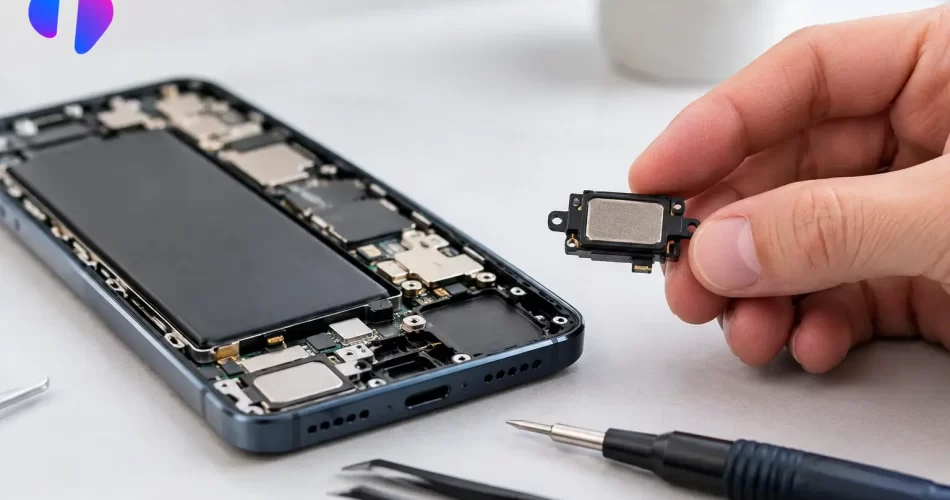
Most Android phones use separate components for media sound and calls. The loudspeaker handles ringtones, videos, music and speakerphone. The earpiece speaker is the small unit at the top of the display used during normal calls. If one works and the other does not, that is a useful clue for diagnosis.
A muffled or low-volume loudspeaker is commonly caused by compacted pocket lint, dust, makeup or moisture blocking the speaker mesh. Darwin’s humidity and wet-weather exposure can make the problem worse, particularly when dust has already collected around the grille. Cleaning the outer mesh carefully may improve sound, but pushing a pin, paperclip or sharp tool into it can puncture the protective mesh or damage the speaker beneath.
Crackling, buzzing or rattling audio usually means the speaker diaphragm has been damaged or contaminated. This can happen after a drop, water exposure or repeated use at maximum volume. The sound may appear normal at low volume and break up as volume increases. In that case, a replacement loudspeaker module is often the practical repair.
Complete loss of sound needs more investigation. A phone may be stuck in headphone mode, connected to a Bluetooth device, affected by a software fault, or suffering a board-level issue. Replacing a speaker without testing the rest of the audio circuit can waste time and leave the original fault unresolved.
Check these simple causes first
A few quick checks can rule out settings issues before booking an Android speaker repair. Turn Bluetooth off and test a ringtone or video. Remove wired headphones or USB-C audio accessories, then restart the phone. Check that media volume is raised, not just call volume, and make sure Do Not Disturb is not changing how calls and notifications behave.
Next, test different functions. Play a video, make a normal phone call, switch that call to speakerphone and record a voice note. If audio works through headphones but not the phone speaker, the loudspeaker circuit becomes the likely suspect. If callers cannot hear you, that points towards a microphone fault rather than a speaker fault.
It is also worth checking the speaker grille under good light. Surface debris can be removed gently with a soft, dry brush. Do not use compressed air at close range, liquids or metal picks. These methods can drive moisture and debris deeper into the device, damage a mesh seal or create a new fault.
When software is the problem
Not every sound failure is hardware. Android updates, app conflicts and corrupted settings can affect audio routing. If the issue began immediately after an update, try restarting the handset and testing it in safe mode where available. This temporarily stops downloaded apps from running, helping identify whether an app is interfering with sound.
A system reset may help in some cases, but it should not be the first move when your data matters. Back up photos, messages, authentication apps and work files first. If the speaker stopped working after a drop, liquid exposure or a charging-port problem, a reset is unlikely to repair physical damage.
Some devices also report water or debris in the USB-C port. That warning can prevent charging and can interfere with audio accessories. Let the phone dry naturally in a ventilated area. Avoid heat guns, ovens and rice – heat can damage screens, batteries and internal seals, while rice does not remove corrosion.
Android speaker repair after water damage
Water damage is one of the most unpredictable causes of audio failure. A phone might keep working after getting wet, then develop crackling sound, a dead earpiece or intermittent speakerphone days later as corrosion spreads. Saltwater, pool water and sugary drinks are especially damaging because residue remains on the board and connectors.
Switch the device off if possible and do not keep charging or testing it. The more power passing through a wet device, the greater the chance of short circuits. A professional assessment can determine whether the speaker module, charging assembly, microphone flex or logic board has been affected.
For some phones, the speaker is a modular part that can be replaced quickly. For others, corrosion reaches the board-level audio circuitry. That calls for proper diagnostics and, where needed, micro-soldering rather than a standard parts swap. This distinction matters when sound is missing from several functions at once, or when the phone also has charging, microphone, boot loop or network issues.
Why the fault may not be the speaker
Modern Android phones route audio through several components. The charging port board may include microphones and antenna connections. The main board controls audio processing and power. Flex cables carry signals between components, and damaged housings can affect how a speaker seals and resonates.
A hard drop can loosen a connector or crack a board trace even if the phone has no obvious external damage. A previous screen replacement can also lead to earpiece or proximity-sensor issues if parts are misaligned or a flex cable is damaged. These faults need a careful inspection, not guesswork.
This is why a proper repair process starts with testing. A technician should confirm whether the issue affects the loudspeaker, earpiece, microphone, headphone audio or Bluetooth output. They can inspect the port and mesh, check for liquid indicators, test known-good components and determine whether the problem is mechanical, software-related or board-level.
What a professional repair should include
For a simple loudspeaker replacement, the phone is opened, the faulty part is removed, and the replacement is tested before the device is resealed. The important part is the testing: calls, media playback, volume levels and microphones should all be checked so the phone leaves working as it should.
If the fault is more complex, diagnostics should be clear about the next step. A damaged charging port assembly may need replacement. Corrosion may need cleaning and component-level repair. A failed audio IC or damaged logic board may require micro-soldering. It depends on the model, the damage history and whether the device has been exposed to liquid or an unsuccessful repair attempt.
For busy Darwin customers, turnaround matters. Many straightforward speaker repairs can be completed quickly once the correct part and fault are confirmed. More involved water-damage and logic-board repairs take longer because they need deeper testing. The right repairer will explain that difference upfront rather than promising a fix before diagnosing the device.
At iSmashed, Android devices are assessed beyond the obvious speaker module. That means checking the full audio path where needed, from grilles and connectors to charging assemblies and logic-board faults. Repairs are backed by a clear 3-month parts warranty, giving you confidence once your phone is back in daily use.
Avoid turning a minor sound fault into a bigger repair
The temptation to keep using a phone with distorted sound is understandable, especially when everything else works. But crackling after liquid exposure, a speaker that cuts in and out, or audio that fails when charging can be an early warning of corrosion or a damaged connector. Continuing to charge a wet or unstable phone can make recovery harder.
Back up your data while the device still switches on. Then have the fault assessed before attempting a DIY opening, aggressive cleaning or a factory reset that erases information without fixing the hardware. A clear diagnosis gets you closer to hearing your calls, alarms and media properly again – without unnecessary downtime.